Hiển thị các bài đăng có nhãn Keyboard App. Hiển thị tất cả bài đăng

Thứ Sáu, 18 tháng 10, 2013

Sliding Emoji Keyboard v1.22 Android App

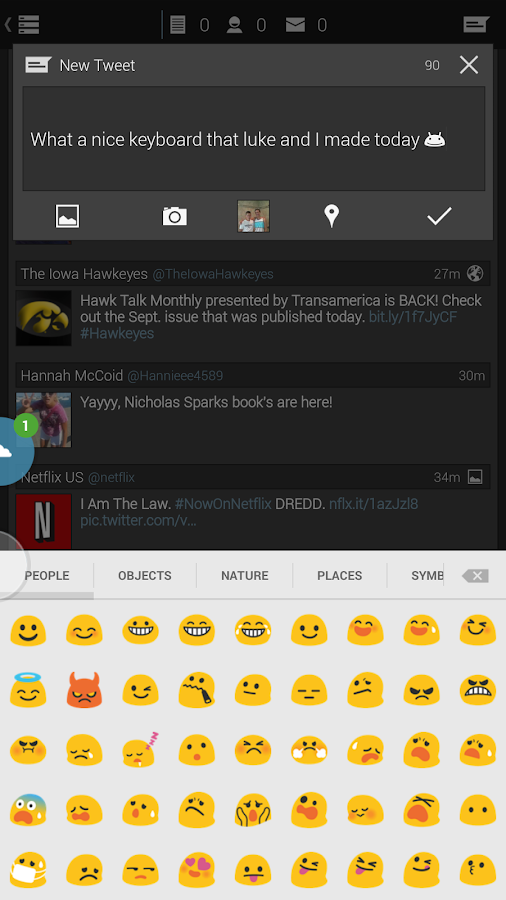
Sliding Emoji Keyboard Unlock - screenshot 
Sliding Emoji Keyboard v1.22 Android App
This keyboard only supports Google’s new Google+ emojis, the ones in their hangouts app. Even though it doesn’t show them correctly in the text boxes, when you send the message/tweet/email or whatever you are using it for, they will show up correctly, again as long as the app supports Google’s new emojis. The recipient will receive them fine as well, as long as their phone has emoji support. They will be received fine on any iOS devices and any messaging app for Android that supports them. Almost all do by now.

To actually see the emojis in the app, you will have to install an app that supports them. Examples of this would be: Sliding Messaging Pro, WhatsApp, Hangouts, and many more, you will have to find out yourself if the app you want to use our keyboard with supports them. 

How to Enable/Use:-
★ To enable the “Sliding Emoji Keyboard”, go to Settings -> Language & Keyboard, then check the “Sliding Emoji Keyboard” to enable it.
★ To use “Sliding Emoji Keyboard”, you need to change the input method:
- In Android 2.3 and below, select “Sliding Emoji Keyboard” from the dialog that comes up after long pressing on any text box.
- In Android 4.0 and above, drag down the notification tray when a text box is selected, then select “Sliding Emoji Keyboard” after switching the input method.
— Quick Switching Techniques —
 

The fastest way to switch between the normal keyboard that you use and our emoji one is to:
1.) Long click on the space button in your normal keyboard
2.) That will bring up the Input Method Switcher dialog box, select the “Sliding Emoji Keyboard” from the dialog
3.) When you are done with your emojis, just long press on our delete button and it will revert to your previous keyboard.


File Size:- 2.16 MB + 8.51 KB


Ultra Keyboard v7.2.1 Android App

 Ultra Keyboard v7.2.1
Ultra Keyboard v7.2.1 Android App has many features designed to give you a better Android keyboard experience.

Main Features:-
★ Choose your favorite way to type. Touch-type like usual, or combine adjacent keys into COMPACT KEYS so they’re easier to press. Slide your finger over words using WORD TRACING (instead of touching each individual letter);

★ The SUGGESTION BAR is smart and easy to use. Choose words with just one swipe, even if they’re not visible at first. A built-in English LANGUAGE DICTIONARY is included (and many other languages are available for download). Add new words to your personal CUSTOM DICTIONARY. BLACK LIST words you don’t want showing up anymore;
★ Use WORD REPLACEMENTS to automatically expand abbreviations. Tired of always typing “be right there”? Try “brt”. You can even create your own;
★ The TOOL BAR provides a ton of functionality in a small amount of space. You can scroll, drag, or flick through the available options;
★ Use SPEECH-TO-TEXT to transform your spoken words into text. TRANSLATE your text to dozens of different languages;
★ CUT, COPY, and PASTE with a built-in CLIPBOARD. Text you copy is saved so you can access it later. Remove anything you don’t want to keep;
★ FULL-SCREEN MODE provides TEXT SELECTION HANDLES and a MAGNIFIER so you can accurately select portions of text to edit or copy;
★ Use the CAMERA OVERLAY* to see where you’re going while you type on the go (* Android 2.3 or newer only);
★ Set ACTIONS to be triggered by GESTURES on the keyboard, or set them to physical buttons on your device. For example, you can set your device’s search button to activate the camera overlay;
★ A DYNAMIC UI means you can customize the keyboard so it’s perfect for you. Are the keys too tall for your liking? Make them shorter. Don’t like the ARROW KEYS? Hide them. Many things can be tweaked directly from the tool bar;
★ Change the keyboard’s look with downloadable THEMES (even some that were made for other keyboards). You can use the built-in THEME EDITOR to create your own themes, or customize existing themes with your chosen fonts and colors.

File Size:- 4.44 MB